> ## Documentation Index
> Fetch the complete documentation index at: https://docs.pixldata.com/llms.txt
> Use this file to discover all available pages before exploring further.
# Label Schema
The **Label Schema** (or Ontology) is the structural blueprint of a project. It defines the rules, classifications, and metadata requirements for every annotation. PixlHub provides a highly flexible schema builder, allowing for granular data collection through nested hierarchies and diverse input types.
### **Building the Ontology**
A project is organized around **Classes** (e.g., "Vehicle," "Sign," "Obstacle"). To capture detailed information without cluttering the class list, each class can be refined with multiple **Attributes**.
The schema supports several input types to ensure data is structured correctly:
* **Text:** For manual entries like license plates or serial numbers.
* **Number:** For numerical values, counts, or measurements.
* **Radio:** For selecting a single option from a list.
* **Checkbox:** For simple boolean (True/False) properties.
* **Dropdown:** For choosing one option from a large list.
* **Multi-select:** For applying multiple relevant tags to a single object.
 ### **Nested (Child) Attributes**
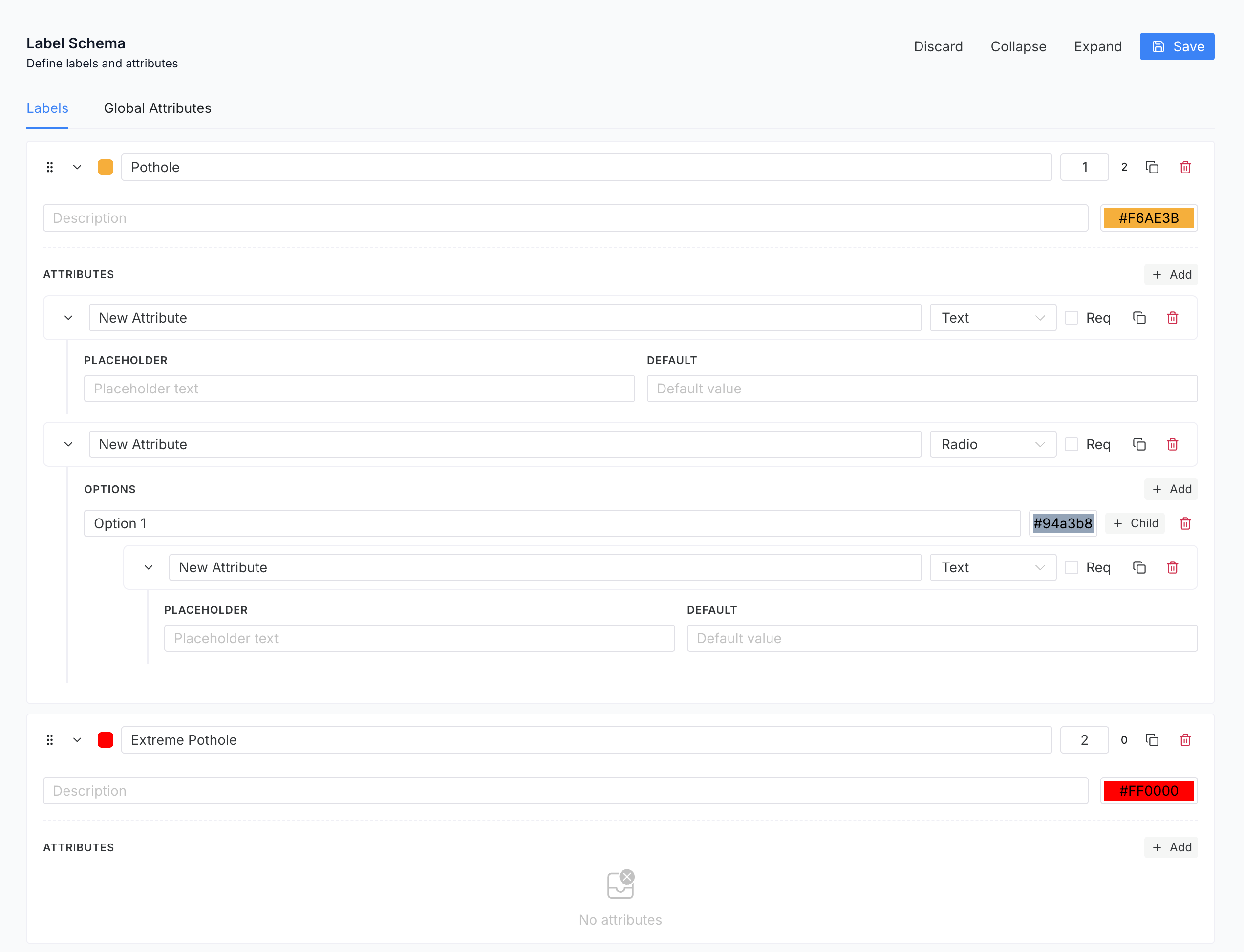
To manage complex data requirements, PixlHub utilizes **Child Attributes**. This feature introduces conditional logic to the annotation process, ensuring that the interface remains clean and focused.
* **Conditional Logic:** Child attributes only appear when a specific "Parent" option is selected. For example, selecting "Vehicle Type: Truck" can trigger a sub-menu for "Trailer Type," which would remain hidden if "Sedan" were selected instead.
* **UI Optimization:** By hiding irrelevant fields, child attributes reduce cognitive load for annotators, minimizing errors and speeding up the labeling process.
* **Deep Hierarchies:** Managers can create multiple levels of nesting to capture high-fidelity data for specialized AI models.
### **Global Attributes**
While standard attributes describe specific objects, **Global Attributes** are used to define metadata for the entire asset or task. These are ideal for capturing situational context, such as:
* **Environment:** Weather conditions (Rain, Snow), lighting (Day, Night), or location type.
* **Data Quality:** Image clarity, sensor noise levels, or "Unlabelable" flags.
* **Scene Classification:** Identifying the overall category of the frame (e.g., Urban, Rural, Highway).
### **Nested (Child) Attributes**
To manage complex data requirements, PixlHub utilizes **Child Attributes**. This feature introduces conditional logic to the annotation process, ensuring that the interface remains clean and focused.
* **Conditional Logic:** Child attributes only appear when a specific "Parent" option is selected. For example, selecting "Vehicle Type: Truck" can trigger a sub-menu for "Trailer Type," which would remain hidden if "Sedan" were selected instead.
* **UI Optimization:** By hiding irrelevant fields, child attributes reduce cognitive load for annotators, minimizing errors and speeding up the labeling process.
* **Deep Hierarchies:** Managers can create multiple levels of nesting to capture high-fidelity data for specialized AI models.
### **Global Attributes**
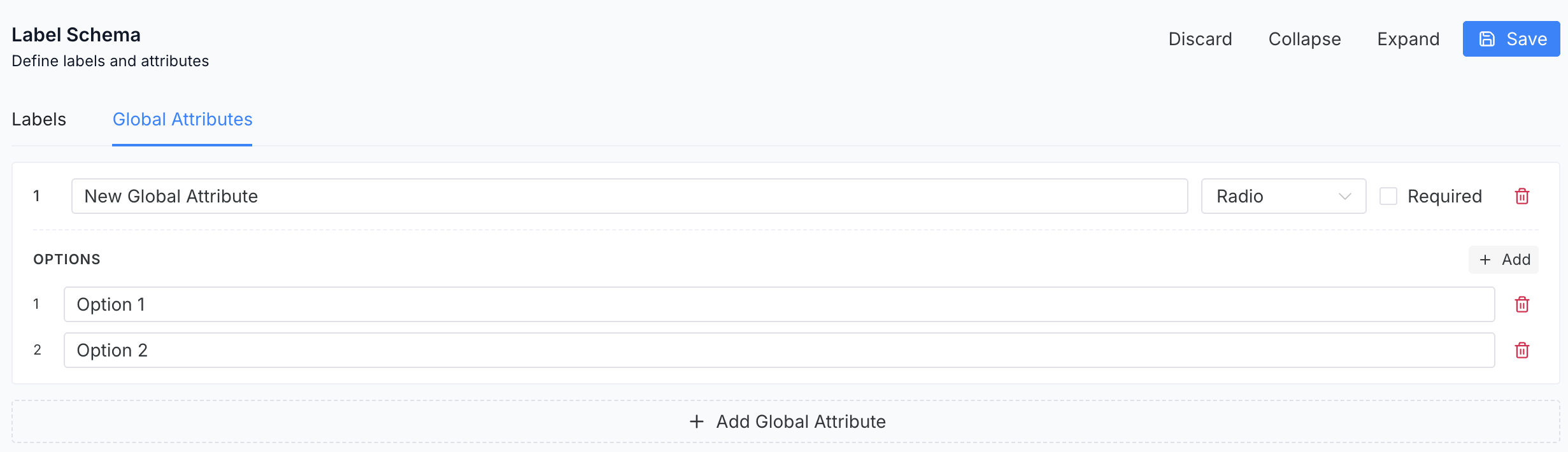
While standard attributes describe specific objects, **Global Attributes** are used to define metadata for the entire asset or task. These are ideal for capturing situational context, such as:
* **Environment:** Weather conditions (Rain, Snow), lighting (Day, Night), or location type.
* **Data Quality:** Image clarity, sensor noise levels, or "Unlabelable" flags.
* **Scene Classification:** Identifying the overall category of the frame (e.g., Urban, Rural, Highway).
 ### **Customization & Efficiency**
The Label Schema includes features designed to maximize annotator throughput and maintain visual organization:
* **Color Assignment:** Each class can be assigned a unique color. This makes the canvas instantly readable and helps distinguish between overlapping objects at a glance.
* **Keyboard Shortcuts:** Classes and attributes can be mapped to specific hotkeys (e.g., **1, 2, 3, 4**). This allows annotators to switch between labels and confirm attributes without moving the mouse, significantly reducing the time-per-task.
### **Customization & Efficiency**
The Label Schema includes features designed to maximize annotator throughput and maintain visual organization:
* **Color Assignment:** Each class can be assigned a unique color. This makes the canvas instantly readable and helps distinguish between overlapping objects at a glance.
* **Keyboard Shortcuts:** Classes and attributes can be mapped to specific hotkeys (e.g., **1, 2, 3, 4**). This allows annotators to switch between labels and confirm attributes without moving the mouse, significantly reducing the time-per-task.