> ## Documentation Index
> Fetch the complete documentation index at: https://docs.pixldata.com/llms.txt
> Use this file to discover all available pages before exploring further.
# Project Workflow
> How tasks move through a PixlHub project: the default Label, Review, Done pipeline, live task counts on each step, and the visual workflow editor with its node palette.
Every task in a project travels a pipeline, and the **Workflow** tab is where that pipeline lives: a visual graph you can read at a glance and reshape when your process outgrows the default.
## The default pipeline
New projects start with three steps wired together:
**Label** → **Review** (Accepted / Rejected) → **Done**
* Submitting a task in the editor moves it from Label to **Review**.
* A reviewer accepts it (forward to **Done**) or rejects it (back to **Label**, with comments explaining why).
* Each node shows a live count of the tasks currently sitting in that step, so the graph doubles as a bottleneck monitor: a fat Review count means labelers are outrunning reviewers.
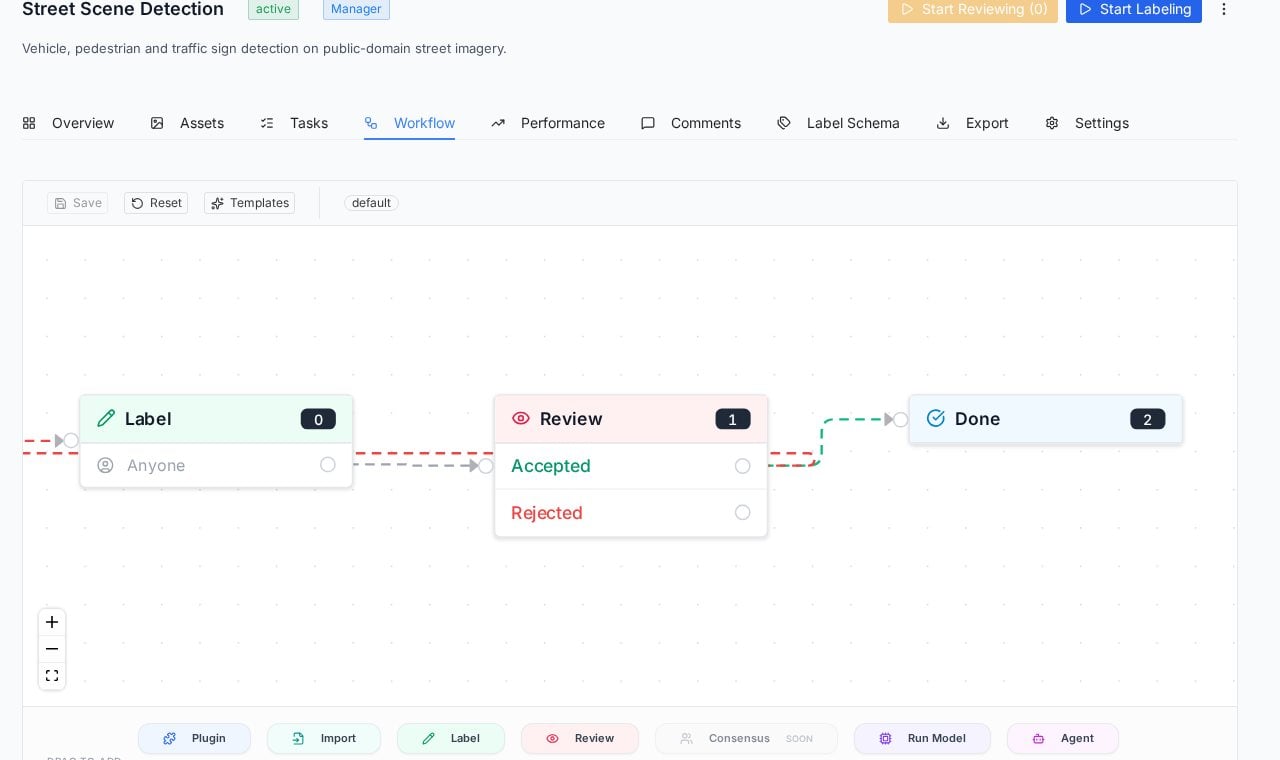 ## The workflow editor
The graph is editable: drag to rearrange, connect steps, and extend the pipeline from the node palette at the bottom of the canvas. **Templates** offers ready-made pipeline shapes, and **Save** / **Reset** manage your changes (the shipped pipeline is the sensible default until your QA process demands more).
## The workflow editor
The graph is editable: drag to rearrange, connect steps, and extend the pipeline from the node palette at the bottom of the canvas. **Templates** offers ready-made pipeline shapes, and **Save** / **Reset** manage your changes (the shipped pipeline is the sensible default until your QA process demands more).
 | Node | What it adds to the pipeline |
| ------------- | ---------------------------------------------------------------- |
| **Label** | A human annotation step, assignable to specific people or anyone |
| **Review** | A quality gate with accept and reject branches |
| **Import** | An entry point for data flowing into the pipeline |
| **Run Model** | A model inference step, for pre-labeling or automated checks |
| **Agent** | An AI agent step for intelligent processing |
| **Plugin** | An integration hook for external systems |
| **Consensus** | Multi-annotator agreement (marked as coming soon in the palette) |
The assignment chip on a Label node (for example "Anyone") controls who can pull those tasks. Team roles decide who can pull from each queue; the dedicated guide for roles is on its way.
## Reading workflow state elsewhere
The pipeline's state surfaces across the project so you rarely need to open the graph to know where things stand: the **[Tasks](/guides/essentials/tasks)** tab shows per-step queue counts and each task's current status; the project header's **Start Labeling** and **Start Reviewing** buttons show how many tasks wait in each queue; and the Overview tab tracks completion percentage against the whole pipeline.
## Practical patterns
* **Keep Review in the loop even for solo projects.** Reviewing your own day-old labels catches a surprising share of errors, and the Rejected path documents what changed.
* **Watch the node counts weekly.** They are the earliest signal of a staffing imbalance between labeling and review.
* **Extend only when the default hurts.** A second review step or a model pre-labeling node earns its complexity on high-stakes or high-volume datasets, not on a 200-image pilot.
## Frequently asked questions
It returns to the Label step carrying the reviewer's comments. The original annotator sees the feedback pinned in context and resubmits after fixing.
Yes, the workflow belongs to the project. A quick internal dataset can run Label to Done while a production dataset runs a stricter pipeline.
No. The default pipeline covers the standard label-review loop out of the box; the editor exists for the day your process needs more steps, models or integrations.
## Next steps
The queue view: filters, bulk actions, and per-task history.
Where reviewer feedback lands, pinned to the pixels it concerns.
| Node | What it adds to the pipeline |
| ------------- | ---------------------------------------------------------------- |
| **Label** | A human annotation step, assignable to specific people or anyone |
| **Review** | A quality gate with accept and reject branches |
| **Import** | An entry point for data flowing into the pipeline |
| **Run Model** | A model inference step, for pre-labeling or automated checks |
| **Agent** | An AI agent step for intelligent processing |
| **Plugin** | An integration hook for external systems |
| **Consensus** | Multi-annotator agreement (marked as coming soon in the palette) |
The assignment chip on a Label node (for example "Anyone") controls who can pull those tasks. Team roles decide who can pull from each queue; the dedicated guide for roles is on its way.
## Reading workflow state elsewhere
The pipeline's state surfaces across the project so you rarely need to open the graph to know where things stand: the **[Tasks](/guides/essentials/tasks)** tab shows per-step queue counts and each task's current status; the project header's **Start Labeling** and **Start Reviewing** buttons show how many tasks wait in each queue; and the Overview tab tracks completion percentage against the whole pipeline.
## Practical patterns
* **Keep Review in the loop even for solo projects.** Reviewing your own day-old labels catches a surprising share of errors, and the Rejected path documents what changed.
* **Watch the node counts weekly.** They are the earliest signal of a staffing imbalance between labeling and review.
* **Extend only when the default hurts.** A second review step or a model pre-labeling node earns its complexity on high-stakes or high-volume datasets, not on a 200-image pilot.
## Frequently asked questions
It returns to the Label step carrying the reviewer's comments. The original annotator sees the feedback pinned in context and resubmits after fixing.
Yes, the workflow belongs to the project. A quick internal dataset can run Label to Done while a production dataset runs a stricter pipeline.
No. The default pipeline covers the standard label-review loop out of the box; the editor exists for the day your process needs more steps, models or integrations.
## Next steps
The queue view: filters, bulk actions, and per-task history.
Where reviewer feedback lands, pinned to the pixels it concerns.