> ## Documentation Index
> Fetch the complete documentation index at: https://docs.pixldata.com/llms.txt
> Use this file to discover all available pages before exploring further.
# Reviewing Tasks
> The reviewer's guide to PixlHub: entering review mode, inspecting annotations, accepting or rejecting with one click, and giving feedback that actually reaches the labeler.
Review is where a labeled task becomes trusted data. PixlHub gives reviewers the same canvas the labeler used, every annotation inspectable, and a two-button verdict in the header. This page covers the mechanics and the habits that make review genuinely improve quality instead of rubber-stamping it.
## Enter review mode
Click **Start Reviewing** in the project header; the button shows the live count of tasks waiting. Review mode opens at `/review` with the first queued task loaded.
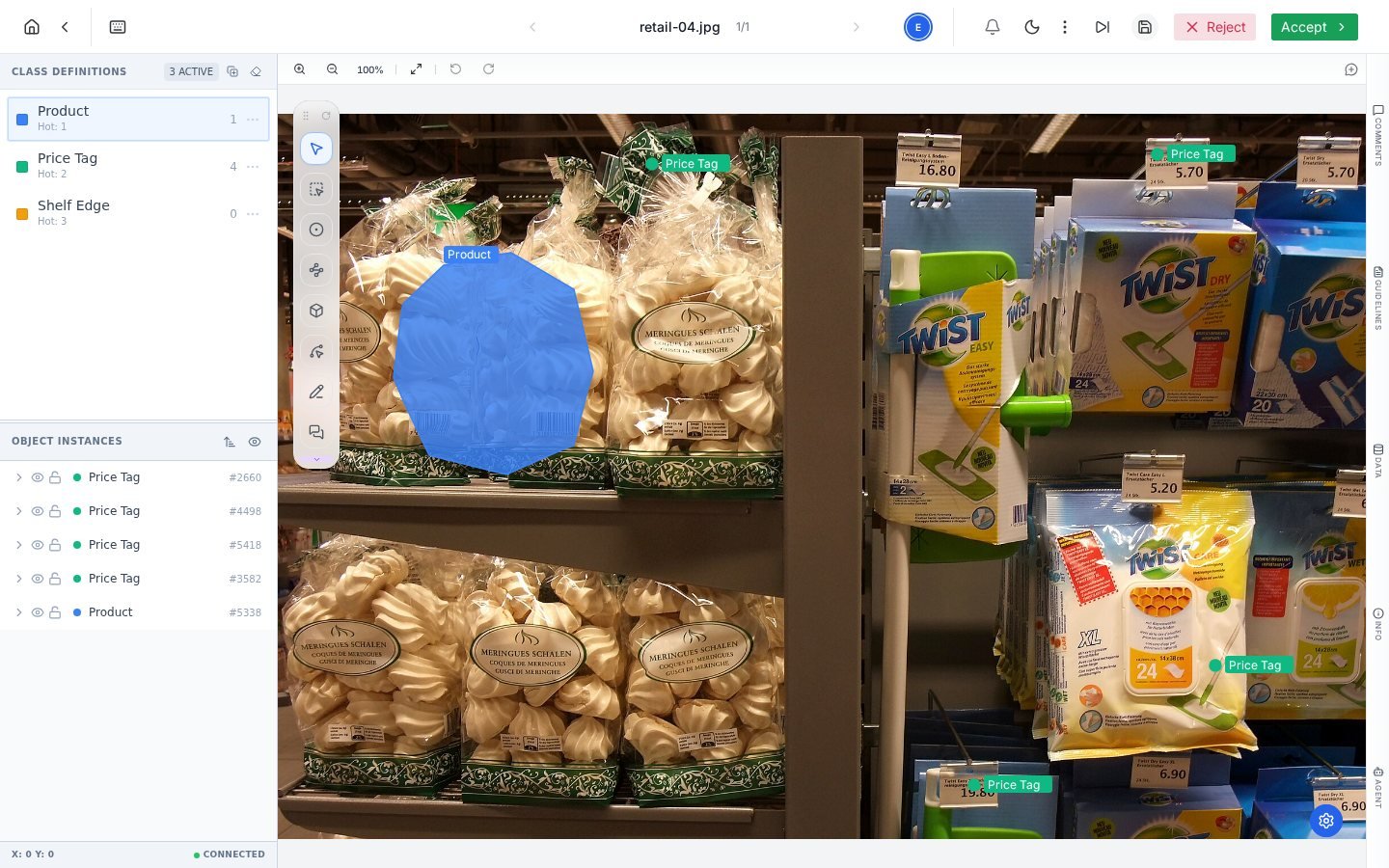 Everything you know from the editor applies here: zoom and fit, per-object visibility and lock in Object Instances, class counts, the Guidelines tab one click away for checking a call against the rules. Reviewers can also adjust annotations directly when a small fix is faster than a rejection round-trip.
## The verdict
Two buttons in the header decide the task's fate, and both act **immediately**:
* **Accept** marks the task complete and advances it to Done. The next queued task loads automatically.
* **Reject** sends the task straight back to the Label queue for rework.
There is no confirmation step or reason prompt on these buttons. **Leave your feedback as a pinned comment before clicking Reject**: click the Comment tool, pin the exact problem, write what needs to change, then reject. A rejection without a pinned comment sends the labeler a puzzle, not a correction.
## The feedback loop done right
Judge annotations against the written rules, not personal taste. If the guideline is silent on the case in front of you, that is a guideline gap; fix the document, not just the task.
Use the [Comment tool](/guides/basics/comment) on the exact object: "box clips the bag edge on the left" beats a general note. Mention the labeler with @ so it lands in their notifications.
Accept, or reject now that the reasons are attached. The rejected task returns to the label queue with your pins in place.
## What the counters tell you
Accepted work moves to **completed**; rejected work re-enters the **label** queue and shows in the [Tasks](/guides/essentials/tasks) table with its full history. Rework and reviewer activity also feed the project's [performance metrics](/guides/quality/performance-analytics): rejection rates and reviewer edit rates are quality signals worth watching weekly, not just at delivery time.
## Frequently asked questions
Yes, annotations are editable in review mode, and the Reviewer Edit Rate metric tracks how often that happens. Quick fixes suit one-off slips; recurring problems deserve a rejection with feedback so the pattern gets corrected at the source.
Review is role-gated: reviewers and managers act on the review queue, and the Start Reviewing button appears for those roles. See Teams and roles.
The task is back in the label queue, not lost: reopen it, restore anything needed, and resubmit. The task history records both movements.
## Next steps
Quality rate, rework and reviewer activity in one tab.
The feedback mechanism reviews run on.
Everything you know from the editor applies here: zoom and fit, per-object visibility and lock in Object Instances, class counts, the Guidelines tab one click away for checking a call against the rules. Reviewers can also adjust annotations directly when a small fix is faster than a rejection round-trip.
## The verdict
Two buttons in the header decide the task's fate, and both act **immediately**:
* **Accept** marks the task complete and advances it to Done. The next queued task loads automatically.
* **Reject** sends the task straight back to the Label queue for rework.
There is no confirmation step or reason prompt on these buttons. **Leave your feedback as a pinned comment before clicking Reject**: click the Comment tool, pin the exact problem, write what needs to change, then reject. A rejection without a pinned comment sends the labeler a puzzle, not a correction.
## The feedback loop done right
Judge annotations against the written rules, not personal taste. If the guideline is silent on the case in front of you, that is a guideline gap; fix the document, not just the task.
Use the [Comment tool](/guides/basics/comment) on the exact object: "box clips the bag edge on the left" beats a general note. Mention the labeler with @ so it lands in their notifications.
Accept, or reject now that the reasons are attached. The rejected task returns to the label queue with your pins in place.
## What the counters tell you
Accepted work moves to **completed**; rejected work re-enters the **label** queue and shows in the [Tasks](/guides/essentials/tasks) table with its full history. Rework and reviewer activity also feed the project's [performance metrics](/guides/quality/performance-analytics): rejection rates and reviewer edit rates are quality signals worth watching weekly, not just at delivery time.
## Frequently asked questions
Yes, annotations are editable in review mode, and the Reviewer Edit Rate metric tracks how often that happens. Quick fixes suit one-off slips; recurring problems deserve a rejection with feedback so the pattern gets corrected at the source.
Review is role-gated: reviewers and managers act on the review queue, and the Start Reviewing button appears for those roles. See Teams and roles.
The task is back in the label queue, not lost: reopen it, restore anything needed, and resubmit. The task history records both movements.
## Next steps
Quality rate, rework and reviewer activity in one tab.
The feedback mechanism reviews run on.