
Anatomy of a label
Each row in the Labels list carries more than a name: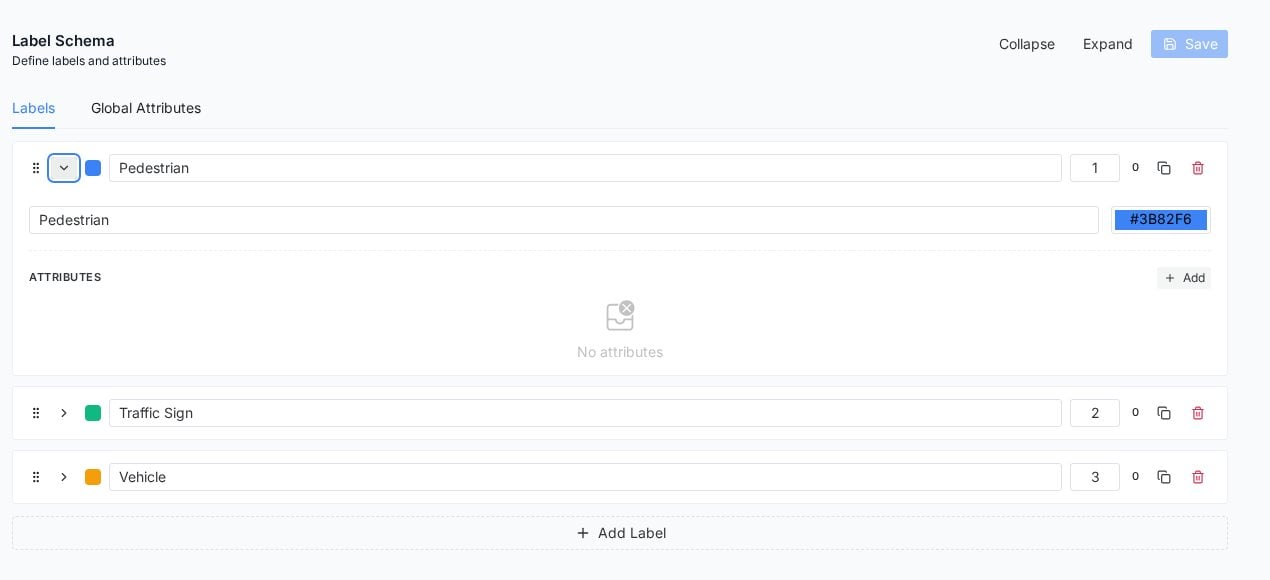
An expanded label: name, color value, and the attributes section. The number on the right doubles as the annotator's hotkey.
- Name, what annotators see on chips and in the instance list.
- Color, editable as a hex value; annotations render in it everywhere, so give visually adjacent classes distinguishable colors.
- Order number, which is also the hotkey annotators press in the editor (shown there as “Hot: 1, 2, 3”). Put your highest-volume classes first.
- Attributes, structured fields attached to this class only (expand the row and click Add): occlusion level for vehicles, ripeness for produce, whatever your downstream model needs beyond the class name.
- Row controls for duplicate and delete, and a drag handle for reordering.
Edit safely
Changes are staged until you click Save, and saving asks for confirmation with the warning that matters: schema changes may affect existing annotations. Renames propagate; deletions orphan the annotations that carried the class. Two habits keep this painless:- Get the taxonomy reviewed in the schema editor before the first labeling session, not after the thousandth annotation.
- When a class must split or disappear mid-project, pause labeling, change the schema, then sweep affected tasks back through Review rather than trusting memory.
Designing a schema that labels well
- Fewer classes, clearer edges. Ten crisp classes outperform thirty overlapping ones; ambiguity you leave in the schema returns as inconsistent data.
- Attributes beat class explosion. “Vehicle” with a type attribute (car, bus, truck) scales better than five sibling classes, and keeps hotkeys manageable.
- Write the one-line rule per class in your Guidelines: the schema names the class, the guideline says when it applies, and annotators need both one click away.
- Mirror your model’s output head. The schema is effectively your dataset spec; if the model predicts three classes, a five-class schema is future rework.
Frequently asked questions
Can annotations mix geometry types within one class?
Can annotations mix geometry types within one class?
Yes. A class is about meaning, not shape: Product can be a box on one asset and a freeform outline on another, and exports preserve each annotation’s geometry.
How many classes can a schema hold?
How many classes can a schema hold?
Practically, keyboard reach is the real limit: hotkeys map to the order number, and schemas beyond ten classes trade away labeling speed. Attributes absorb detail better than extra classes.
Who can edit the schema?
Who can edit the schema?
Schema editing is a project-management action, gated by role; labelers work with the schema rather than on it.
Next steps
Guidelines
Where each class’s when-to-use rule belongs.
Start annotating
The editor where hotkeys and colors come alive.