
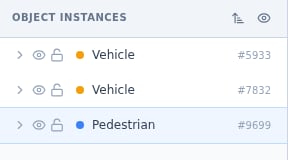
Object instances: class color, name and ID per row, with visibility and lock toggles.
Anatomy of a row
- Class color and name identify what the annotation claims to be.
- The instance ID (like #7302) names this exact annotation, which makes review feedback and discussions unambiguous: “the box is loose” helps nobody, “#7302 is loose” ends the search.
- The eye hides the shape on canvas without deleting anything.
- The lock protects the shape from selection and edits.
- The expand arrow reveals the annotation’s details.
Selection runs both ways
Clicking a row highlights the shape on canvas; selecting a shape on canvas highlights its row. In dense scenes this two-way sync is the fastest way to find one object among forty, and a right-click on either side opens the same context actions.Header controls
- Group by: None → Label reorganizes the flat list into per-class groups, turning “forty rows” into “four folders”.
- Hide all objects clears the canvas view in one click, for when you need to see the raw image under your work.
- The sort control reorders the list without touching the annotations.
Habits for heavy tasks
- Lock what is finished. Vertex handles and draggable boxes invite accidents; locking completed objects makes the rest of the session safe.
- Hide by class, work by class. Group by label, hide the finished classes, and the canvas only shows the work remaining.
- Quote IDs in comments. A pinned comment plus an instance ID is feedback that cannot be misread.
Next steps
Class definitions
The per-class counterpart above this panel.
Reviewing tasks
Where instance-level clarity pays off most.