
Enter review mode
Click Start Reviewing in the project header; the button shows the live count of tasks waiting. Review mode opens at/review with the first queued task loaded.
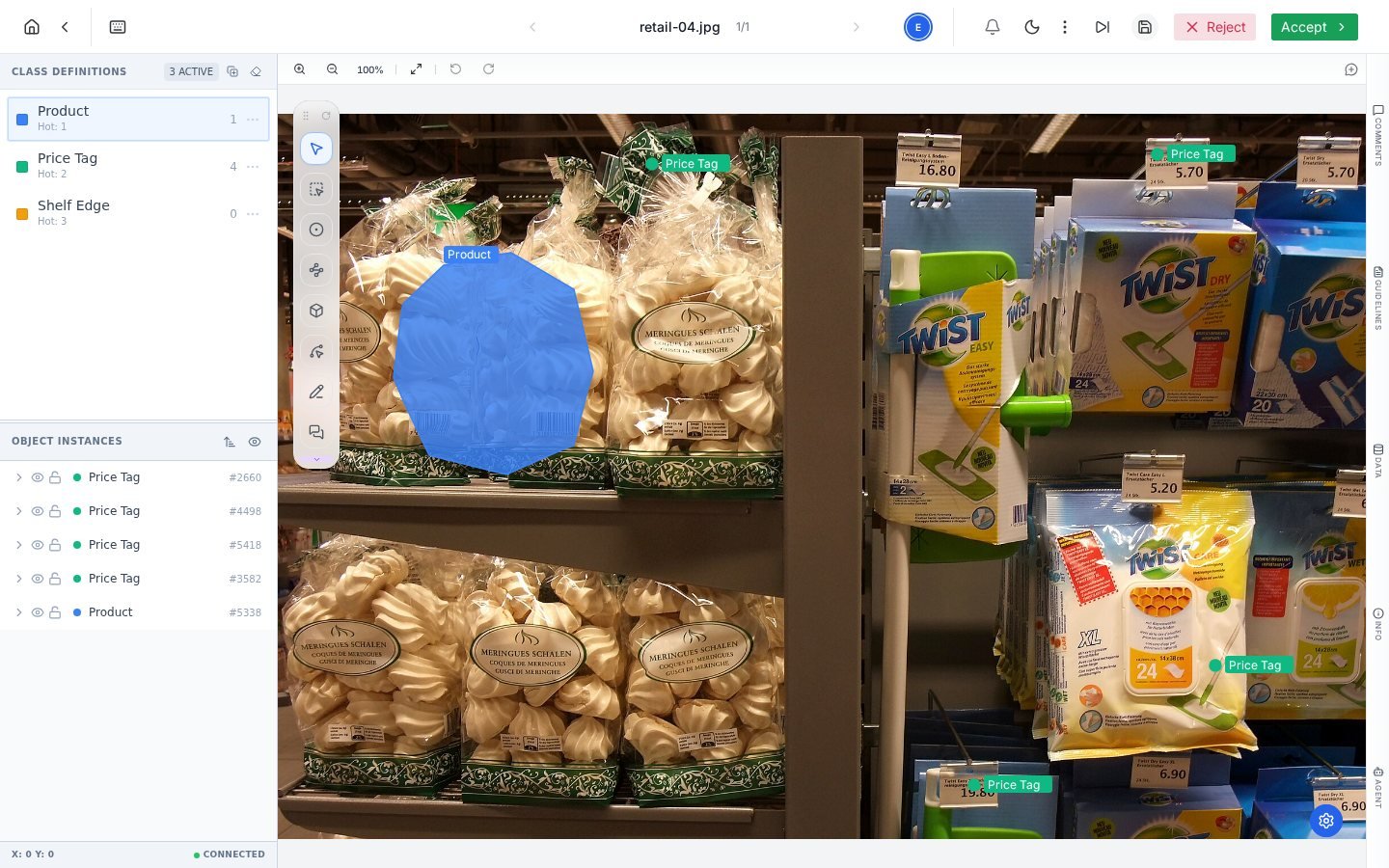
Review mode: the full editor with the task's annotations, and the Accept / Reject verdict in the header.
The verdict
Two buttons in the header decide the task’s fate, and both act immediately:- Accept marks the task complete and advances it to Done. The next queued task loads automatically.
- Reject sends the task straight back to the Label queue for rework.
The feedback loop done right
1
Inspect against the guidelines
Judge annotations against the written rules, not personal taste. If the guideline is silent on the case in front of you, that is a guideline gap; fix the document, not just the task.
2
Pin the problem
Use the Comment tool on the exact object: “box clips the bag edge on the left” beats a general note. Mention the labeler with @ so it lands in their notifications.
3
Deliver the verdict
Accept, or reject now that the reasons are attached. The rejected task returns to the label queue with your pins in place.
What the counters tell you
Accepted work moves to completed; rejected work re-enters the label queue and shows in the Tasks table with its full history. Rework and reviewer activity also feed the project’s performance metrics: rejection rates and reviewer edit rates are quality signals worth watching weekly, not just at delivery time.Frequently asked questions
Can a reviewer fix small issues instead of rejecting?
Can a reviewer fix small issues instead of rejecting?
Yes, annotations are editable in review mode, and the Reviewer Edit Rate metric tracks how often that happens. Quick fixes suit one-off slips; recurring problems deserve a rejection with feedback so the pattern gets corrected at the source.
Who can review?
Who can review?
Review is role-gated: reviewers and managers act on the review queue, and the Start Reviewing button appears for those roles. See Teams and roles.
What if I reject by mistake?
What if I reject by mistake?
The task is back in the label queue, not lost: reopen it, restore anything needed, and resubmit. The task history records both movements.
Next steps
Performance analytics
Quality rate, rework and reviewer activity in one tab.
Comments
The feedback mechanism reviews run on.